
So you finally jump into the From the Ashes DLC for Avatar: Frontiers of Pandora, everything seems fine… and then—crash.
Maybe it happens every 10–15 minutes.
Maybe it worked perfectly yesterday and suddenly decided to fall apart today. Either way, yeah—you’re definitely not imagining things, and no, it’s not just your setup acting weird out of nowhere.
A lot of players are running into constant crashes in the From the Ashes DLC, especially after recent updates rolled out. Some are getting booted back to desktop mid-mission, others can barely explore for more than a few minutes before the game gives up.
It’s frustrating, especially when things were running smoothly before.
The good news? You’re not alone, and this usually isn’t a permanent problem. In most cases, the crashes are tied to a handful of common issues—and yes, they’re often fixable without waiting weeks for a patch.
Let’s break down what’s actually happening and what you can do right now to get back in the game.
Read also: Blaze Fruit Unreachable in Avatar: Frontiers of Pandora: Solved
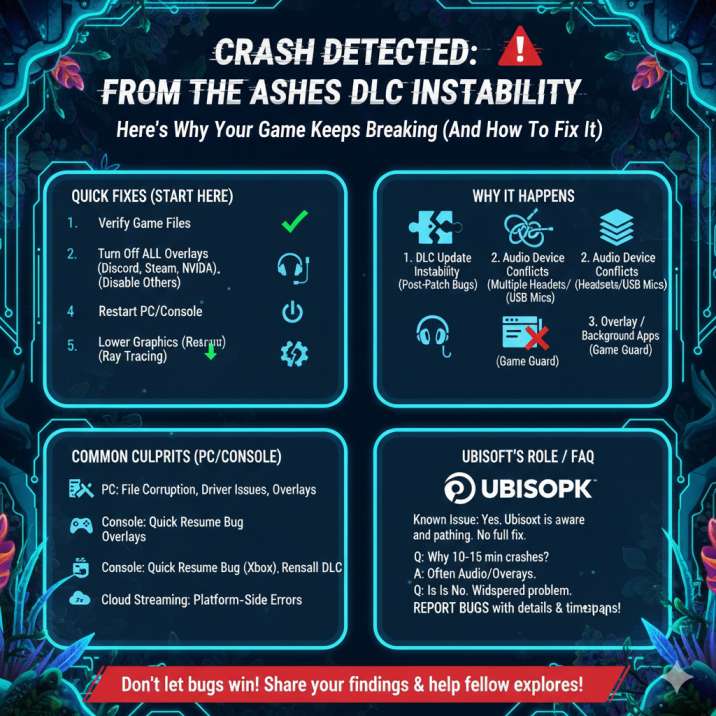
First Things First: Quick Fixes That Actually Help
Before diving into the technical stuff, try these. Seriously—most players who fixed the issue didn’t need to go any deeper than this list.
These are the simplest and fastest steps you can take, and they’ve worked for a surprising number of people dealing with constant crashes in the From the Ashes DLC.
Even if the game was running perfectly fine before, recent updates can introduce small conflicts that these fixes clear up almost immediately.
Try these in order, and don’t skip ahead unless one clearly doesn’t apply to your setup:
- Verify your game files (Steam / Ubisoft Connect / Epic)
- Turn off all overlays (Steam, Discord, NVIDIA, AMD, Xbox Game Bar)
- Set one single audio device as your default (unplug the rest)
- Restart your PC or console after making changes
- Run the game as administrator (PC)
- Temporarily lower graphics settings (especially ray tracing)
If the From the Ashes DLC is crashing every 10–15 minutes, one of these steps usually does the trick without any deeper troubleshooting.
Why the From the Ashes DLC Keeps Crashing
If you’re wondering why this is happening—here’s what players have been running into most often. While crashes can feel random, there is a pattern behind many of the reports, and it usually traces back to changes introduced with the DLC itself rather than something suddenly breaking on your end.
1. The DLC Update Itself
The From the Ashes DLC added new missions, areas, mechanics, and background systems to Avatar: Frontiers of Pandora, and for some setups, that’s caused stability issues—especially right after patches or hotfixes go live. Even small backend changes can have unexpected side effects depending on hardware, drivers, or settings. This is why some players experience crashes despite having no issues before the update.
In short: the DLC is still being ironed out, and not every setup is playing nicely with it yet.
2. Audio Devices Causing Havoc (Way More Common Than You’d Think)
This one surprises a lot of people, but it’s one of the most common causes behind the From the Ashes DLC crashing for seemingly no reason. The game doesn’t always handle multiple active audio devices very well, especially after recent updates, and that can lead to sudden crashes even when performance seems perfectly fine.
If you’ve got:
- Multiple headsets
- USB microphones
- HDMI audio from your GPU
- Virtual audio devices
…they can conflict with the game and cause random crashes during normal gameplay. This often shows up as crashes every 10–15 minutes, or shortly after loading into an area or mission.
Fix: unplug or disable everything except one audio device and set it as your default system output. For many players, crashes stopped immediately after doing this, making it one of the easiest and most effective fixes to try first.
Read also: Missing Banshee skins in Frontiers of Pandora? : Solved
3. Overlays and Background Apps
Overlays inject themselves directly into the game while it’s running, and DLC updates don’t always play nicely with that kind of interference. Even if everything worked perfectly before the From the Ashes DLC dropped, updates can change how the game interacts with background software, leading to unexpected crashes.
For testing, disable:
- Steam Overlay
- Discord Overlay
- NVIDIA GeForce Experience
- AMD Adrenalin Overlay
- Xbox Game Bar
- OBS or other screen capture tools
It’s important to fully turn these off rather than just minimizing them, then restart the game and test again. Yes, even if they worked fine before. Many players found that crashes stopped once overlays were disabled, especially when the game was crashing every 10–15 minutes without any clear warning.
4. Corrupted DLC or Game Files
If the game is crashing without throwing up an error message—especially right after a patch or hotfix—there’s a good chance something didn’t install cleanly in the background.
Even small file issues can cause instability, and they’re not always obvious until you start getting frequent or seemingly random crashes during normal gameplay.
This can happen if an update was interrupted, if files didn’t patch correctly, or if the DLC data didn’t fully sync with the base game.
In these cases, the game might load fine but crash once you enter certain areas or after playing for a short time.
Verifying your game files or reinstalling just the DLC has helped some players fix the issue entirely, making this an easy step that’s well worth trying before moving on to more advanced troubleshooting.
5. Driver Weirdness
Some players started running into crashes shortly after making system-level changes, even though the game itself hadn’t been touched. Driver updates can sometimes introduce new conflicts, especially with recent DLC content that hasn’t been fully optimized across every hardware setup yet.
Some players started crashing after:
- Updating GPU drivers
- Installing new audio drivers
- Updating Windows
If the crashes began immediately after one of these updates, that timing is a big clue.
In many cases, rolling back to the previous stable driver version—or checking for a newer hotfix—can help restore stability. It’s not always ideal, but until everything is fully patched on the game’s side, sticking with a known stable setup can make a noticeable difference.

Platform-Specific Tips
Playing on PC?
If the From the Ashes DLC keeps crashing on PC, it’s best to focus on the areas that tend to cause the most trouble after updates. PC setups vary a lot, and even small differences in software or settings can trigger stability issues that don’t affect everyone the same way.
Start with file verification to make sure the base game and DLC installed correctly. Next, do some audio device cleanup—disable or unplug anything you’re not actively using and leave just one default device enabled. Make sure there are no overlays running in the background, and disable any mods, ReShade, or injectors, even if they worked fine before the DLC launched.
Finally, try switching between fullscreen and borderless windowed mode. It sounds simple, but this change alone has helped some players reduce or completely stop crashes during longer play sessions.
On Steam Deck or Proton?
If you’re playing on Steam Deck or using Proton on Linux and the From the Ashes DLC keeps crashing, stability can depend heavily on the Proton version and your system setup.
Not every update behaves the same way across compatibility layers, so a bit of testing here can go a long way.
Start by trying a different Proton version, switching between the default Stable build and Proton-GE to see which one behaves better with the DLC.
Lowering graphics presets can also help reduce crashes, especially in newer areas or during combat-heavy moments. Make sure to avoid overlays entirely while testing, and keep your audio setup simple with as few active devices as possible.
Small tweaks like these have helped many Steam Deck and Proton users play longer without crashes.
Read also: From the Ashes DLC Stuck on Loading Screen (0%) Avatar: Frontiers of Pandora : Solved
On Console (PS5 / Xbox Series X|S)?
If you’re playing on console and running into crashes with the From the Ashes DLC, start with the basics. A full console restart can clear out lingering system issues, especially after updates or long standby sessions.
If crashes continue, try reinstalling the DLC to make sure the content downloaded correctly and isn’t missing any files.
It’s also worth double-checking that your system firmware is fully up to date, as console updates often include stability fixes that games rely on. On Xbox Series X|S specifically, disabling Quick Resume can help.
While it’s convenient, Quick Resume doesn’t always play nicely with DLC-heavy games and can cause crashes when jumping back into a session.
Using Cloud Streaming?
If you’re playing via a cloud streaming service and dealing with crashes, there’s a chance the issue isn’t entirely on your end. Some crashes appear to be platform-side, meaning they’re related to the streaming environment rather than your account or save file. This can show up as sudden disconnects, freezes, or crashes that don’t happen consistently.
If possible, try testing a local install of the game on PC or console, even briefly. If the crashes don’t happen locally, that’s a strong sign the problem is tied to the cloud platform itself. In that case, waiting for platform-side fixes or checking service status updates may be your best option.
Is Ubisoft Aware of the Crashes?
Yep. Ubisoft has acknowledged crash and stability issues tied to the From the Ashes DLC for Avatar: Frontiers of Pandora, and patches are already rolling out to address some of the problems players have been reporting. While not every issue has been fully resolved yet, fixes are actively being worked on behind the scenes.
The important thing to know is that this isn’t flying under the radar. The crashes are being tracked, and stability improvements are expected to continue with future updates. Translation: it’s not just you, and there’s a good chance things will get smoother as more patches roll out.

Still Crashing? Here’s What to Do Next
If nothing above works and the From the Ashes DLC is still crashing, the next step is to report it properly so it can actually get fixed. Before submitting a bug report, take a few minutes to gather the key details Ubisoft will need to investigate the issue.
Make sure you have:
- Your platform (PC, Steam Deck, PS5, Xbox)
- Your game and DLC version
- Your GPU and driver version (PC only)
- How often the crash happens (for example, every 10–15 minutes)
- What you’re doing in-game when it crashes
Once you have that information, submit a report to Ubisoft Support or post on the official forums. The more clear and detailed your report is, the easier it is for the issue to be reproduced—and the faster it’s likely to get addressed.
Read also: Blaze Fruit Unreachable in Avatar: Frontiers of Pandora: Solved
Quick FAQ
Why does the From the Ashes DLC crash every 10–15 minutes?
Usually due to audio device conflicts, overlays, or post-update instability. Recent updates can introduce unexpected issues depending on hardware, drivers, or background software, which is why some players experience frequent crashes even if the game ran fine before.
Is the From the Ashes DLC broken?
Not completely—but it is unstable for some players right now. Many players can run the DLC without issues, while others are dealing with repeat crashes, which points to compatibility and optimization problems rather than a universal failure.
Does reinstalling the DLC help?
Sometimes, yes. Verifying files is usually worth trying first, but reinstalling the DLC can help if something didn’t install correctly during an update.
Is this PC-only?
Nope. Players on PC, Steam Deck, consoles, and cloud platforms have all reported crashes, though the causes and fixes can vary by platform.
Bottom Line
You’re not alone—this is a known issue, and a lot of players are dealing with the same crashes right now. The good news is that most crashes don’t require deep technical troubleshooting or waiting weeks for a major patch.
In many cases, the fixes are simple and come down to cleaning up background software or system settings that don’t play nicely with the DLC.
Audio devices and overlays are by far the biggest culprits, especially if the game crashes every 10–15 minutes without warning. Sorting those out has helped a large number of players get back to stable gameplay.
On top of that, Ubisoft is actively patching the DLC, so additional stability improvements are very likely on the way.