
So you’ve pinned Blaze Fruit in the Hunter’s Guide, followed the marker across half of Pandora… and when you finally get there, it looks like the plant is inside the mountain. No pickup prompt. No fruit. Just pure frustration.
Good news first: this isn’t a skill issue.
Bad news: it’s a known Blaze Fruit bug in Avatar: Frontiers of Pandora.
The even better news? There are a few workarounds that usually get you unstuck pretty quickly.
What makes this bug extra annoying is how convincing it looks. The marker is there, Na’vi Senses light it up, and everything suggests you’re in the right place — but the game simply refuses to cooperate. You can fly around the area, check above and below the marker, or even circle the mountain multiple times, and nothing changes.
That’s because the issue isn’t about positioning or timing; it’s a broken interaction state. Once you know that, the frustration eases a bit — and fixing it becomes a lot more manageable.
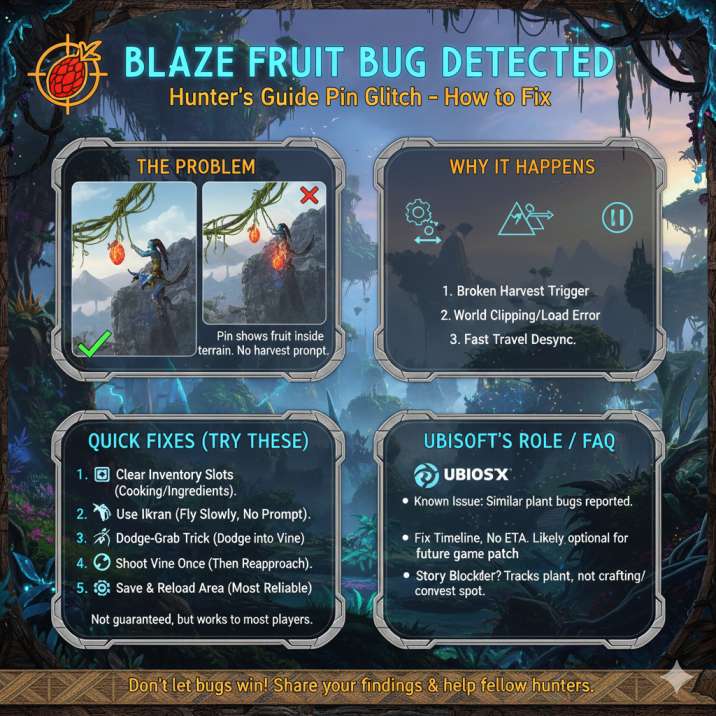
Yes, Blaze Fruit Is Bugged (And It’s Pretty Common)
A lot of players run into the same problem:
Blaze Fruit marker shows up, but the fruit isn’t visible
The pin looks buried inside rock or terrain
Flying around or under the mountain does nothing
No harvest prompt ever appears
What’s happening is simple: the game knows the plant should be there, but the harvest trigger doesn’t load correctly, usually after fast travel or quest tracking.
This is why the marker feels misleading — it’s pointing to a valid spawn location, but the actual interaction point never properly appears in the world. Once this happens, no amount of repositioning or scanning will fix it on its own.
The plant isn’t hidden or locked behind some secret path; it’s simply bugged. This issue has been reported across multiple regions of the map, making it a fairly common experience rather than a rare edge case.
Read also: Deeds of a Champion Grim Favor Bug – Why Your Nahantu Progress Is Stuck at 0/10
Why Blaze Fruit Looks “Stuck” in the Mountain
Blaze Fruit grows on Whip Leaf vines, which are meant to be harvested from the air. The issue is that the Hunter’s Guide tracks the plant location, not the exact spot where the harvest interaction appears.
When the world loads incorrectly:
The interaction point clips into terrain
The marker stays visible
The fruit becomes unreachable
That’s why circling the mountain won’t help — you’re chasing a broken interaction, not a hidden entrance. From the player’s perspective, it feels like there must be some correct angle or hidden path you’re missing, but that isn’t the case here. The game has already decided where the plant exists; it just failed to place the usable part in a reachable space. Once that happens, the marker becomes misleading rather than helpful, pointing you toward something that technically exists but can’t be interacted with properly.
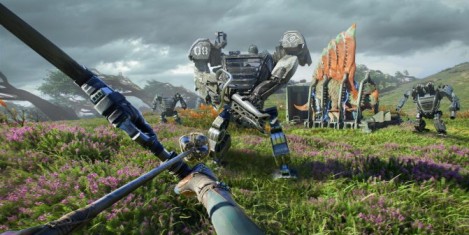
Quick Fixes That Actually Work
Try these in order — most players don’t need to go past step three. These fixes are listed from the fastest and least disruptive to the ones that take a bit more time, so it’s worth following them in sequence instead of jumping around. In most cases, the issue resolves itself early on, especially if the problem was caused by a minor world-loading hiccup or an interaction state failing to initialize correctly.
Even if the Blaze Fruit looks completely unreachable at first, one of these steps will usually force the game to refresh the interaction and make the plant collectible again. Take it slow, reset things methodically, and you’ll likely be back on track without needing to abandon the area entirely.
1. Check Your Inventory First (Seriously)
If your cooking or ingredient inventory is full, Blaze Fruit won’t collect — and the game often doesn’t warn you. This can make it seem like the plant itself is bugged, when in reality the game is quietly blocking the pickup in the background.
Because there’s no clear on-screen message, many players assume they’re doing something wrong or that the Blaze Fruit is completely broken. Before trying anything more complicated, open your inventory and make sure you have free space for ingredients.
Drop a few items, cook something, or store excess materials if possible, then return to the Whip Leaf and try again. In a surprising number of cases, this simple step instantly solves the problem and allows the Blaze Fruit to collect as intended.
2.Make Sure You’re Using Your Ikran
Blaze Fruit is not meant to be picked up on foot.
Do this:
Mount your Ikran
Fly to the middle height of the cliff or floating spire
Use Na’vi Senses
Slowly approach the Whip Leaf
If you’re in the right spot, your character’s hand will raise and the fruit will auto-collect. There isn’t always a button prompt. This is where a lot of players get tripped up, because the game doesn’t clearly explain that Blaze Fruit uses a different collection method than most ground plants.
Flying too fast, approaching from the wrong angle, or expecting a manual interact prompt can all make it seem like nothing is happening. Take it slow, make small adjustments in the air, and watch your character’s animation rather than waiting for on-screen text. When it works, it happens automatically, even if it doesn’t look obvious at first.
3.Use the Dodge-and-Grab Trick
This one feels janky, but it works surprisingly often.
Fly straight at the Whip Leaf
Let it lash out
The harvest can trigger during the animation, even when the marker looks bugged. What’s happening here is that the game briefly registers your character as being in the correct harvest range during the attack and dodge window, even if the interaction point isn’t clearly visible. Timing matters more than precision, so don’t worry if it takes a couple of tries to get right. Approach at a steady speed, watch for the vine’s attack, and dodge just as it strikes. Even if you don’t see a prompt, the Blaze Fruit can still collect automatically mid-animation, making this one of the most reliable tricks when everything else seems broken.
Read also: Battlefield 6 Helicopter Aim-Guided Missile Bug (Season 1) — Why Your Shots Keep Missing
4. Shoot the Vine Once, Then Re-Approach
If the interaction seems dead:
Shoot the Whip Leaf with an arrow
Put your weapon away
Fly back in slowly
This can reset the plant’s interaction state and make the Blaze Fruit collectible. While it sounds counterintuitive, lightly damaging the vine often forces the game to refresh how that plant behaves in the world.
You don’t need to destroy it or spam arrows — a single shot is enough. After that, putting your weapon away is important, since being in a combat-ready state can sometimes prevent harvesting from triggering correctly.
Once you re-approach at a slow, controlled pace, the interaction often reappears as intended. For many players, this step succeeds when the marker looks completely broken and nothing else has worked.
5. Reload the Area (Most Reliable Fix)
Still no luck?
- Save and quit to the main menu
- Reload your save
or - Fast travel far away
- Come back later
In many cases, the Blaze Fruit respawns correctly after a reload.
What If Blaze Fruit Is Still Unreachable?
If that specific spawn refuses to cooperate:
Mark the location
Move on to another Whip Leaf
Come back later after playing or reloading
It’s a temporary world bug, not a permanent progression blocker. As frustrating as it feels in the moment, the important thing to remember is that Blaze Fruit spawns aren’t unique or one-time only.
Skipping a broken plant won’t lock you out of content or soft-block your progress. In many cases, simply spending time elsewhere, completing another activity, or reloading the area causes the world state to reset and the interaction to work again.
Treat it as a short detour rather than a dead end, and you’ll usually be able to come back later and collect the fruit without any extra trouble.
Read also: Battlefield 6 Veteran Rewards Missing? Here’s What’s Going On
Is Ubisoft Aware of This?
Similar harvesting issues have popped up with other hanging plants too, so this seems tied to world streaming rather than Blaze Fruit alone. These bugs usually get patched quietly, but individual spawns can still break.
That’s why some players encounter the issue repeatedly while others never see it at all. The problem tends to show up after fast travel, long play sessions, or major quest transitions, when parts of the world don’t fully reload as intended.
Even after patches roll out, a specific plant can remain bugged until the area refreshes. It’s frustrating, but it also means the issue isn’t permanent and usually resolves itself over time.
Quick FAQ
Is Blaze Fruit required to finish the story?
No — it’s only needed for certain contributions and crafting. You can complete the main storyline without ever collecting it, so running into this bug won’t stop your overall progress.
Do I always need an Ikran?
Yes. Blaze Fruit is designed for aerial harvesting. The Whip Leaf plants that produce it are placed in locations meant to be accessed from the air, not on foot.
Can this bug break my save?
No. It’s annoying, but it won’t lock your progress or corrupt your save. At worst, it causes a temporary delay.
Why does the Hunter’s Guide pin lie?
It tracks the plant’s base location, not the actual harvest trigger, which is why the marker can be misleading when the interaction fails to load properly.
Bottom Line
If Blaze Fruit looks stuck inside a mountain, it’s the game, not you. This isn’t a hidden mechanic, a missed tutorial, or a case of doing something wrong — it’s simply a bugged interaction.
The important thing is knowing that you’re not blocked permanently. Trying the Ikran approach, clearing your inventory, using the dodge-and-grab trick, shooting the vine once, or reloading the area will usually force the game to reset whatever went wrong.
One of those solutions almost always works sooner or later. It might take a bit of patience, but Blaze Fruit issues are temporary annoyances, not progression stoppers, and you’ll be able to move on once the interaction finally behaves the way it should.