
So you finally spot vine fiber while exploring From the Ashes, line up the shot, knock it down…
…and then nothing happens.
No tracker update.
No inspect prompt.
No pickup.
You walk around it. You reload the area. You shoot another one just to be sure. Still nothing.
If you’re staring at the screen thinking, “Is this bugged, or am I missing something obvious?” — good news: it’s not you. You’re not using the wrong weapon, you’re not standing in the wrong spot, and you definitely didn’t forget how harvesting works.
A lot of players are running into the exact same problem in Avatar: Frontiers of Pandora, and yes — vine fiber really does appear to be glitched in the From the Ashes DLC. The issue seems limited to this DLC, which is why everything feels normal elsewhere but suddenly breaks here.
So before you waste more time second-guessing yourself, let’s break down what’s actually happening and, more importantly, what you can do to get unstuck.
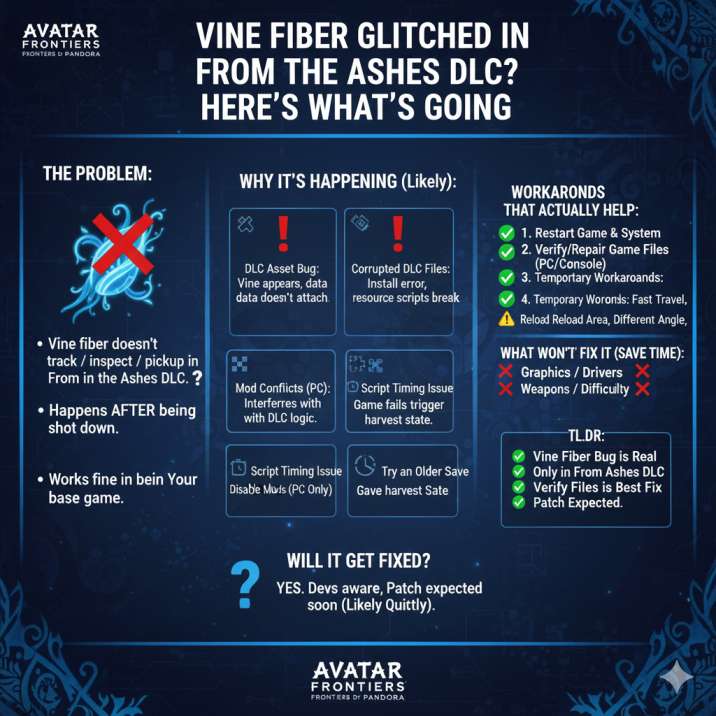
What’s the Vine Fiber Bug?
In short, vine fiber just… stops working the way it should.
Everything looks normal at first. You find the vine, line up your shot, and knock it down exactly the way the game has taught you to. But once it’s on the ground, the usual flow completely breaks.
Players report that in From the Ashes:
- Vine fiber doesn’t show up on the tracker
- You can’t inspect it
- Shooting it down doesn’t let you collect it
- Reloading the area doesn’t help
- The problem only happens in the DLC, not the base game
That last point is the biggest giveaway. Outside of From the Ashes, vine fiber behaves exactly as expected — it appears on the tracker, can be inspected, and can be harvested without any issues. The moment you’re in the DLC, though, the same resource suddenly becomes unresponsive. That consistency strongly suggests this isn’t random bad luck, but a DLC-specific bug affecting how vine fiber is registered and harvested.
Read also: Avatar Frontiers of Pandora Flickering : Solved
Are You Doing Something Wrong?
Nope. Not even a little.
This bug isn’t happening because you missed a step or misunderstood how harvesting works. In fact, it’s showing up for players who already know exactly what they’re doing.
This issue hits players who:
- Know exactly how vine fiber harvesting works
- Have collected it successfully before
- Are using the correct weapons and approach
Under normal circumstances, the process is simple: you spot the vine, shoot it down, walk up to it, and interact to collect the fiber. There’s usually a clear prompt, the tracker updates, and you move on. When that entire interaction just never appears, it’s a clear sign something has gone wrong behind the scenes.
So if you’re standing there waiting for a prompt that never shows up, don’t second-guess yourself. This isn’t a timing issue, a positioning issue, or a learning curve problem — it’s almost certainly a script or asset bug, not a mistake on your part.
You’re Not Alone (This Is Widely Reported)
This isn’t some one-off glitch that only a handful of players have stumbled into by accident. The vine fiber issue has been popping up repeatedly across Reddit and other community forums, with players describing almost identical experiences.
Across these discussions, the same complaints keep coming up:
- “Vine fiber won’t harvest”
- “The tracker doesn’t recognize it at all”
- “It only seems broken in From the Ashes”
- “I can shoot it, but nothing happens after”
What’s important here is the consistency. Different players, different platforms, same symptoms. When a bug shows up this reliably across multiple systems and saves, it’s a strong sign that the problem isn’t tied to an individual file or a single corrupted playthrough. Instead, it points to a DLC-level issue, where something in From the Ashes is preventing vine fiber from being properly tracked and collected.
Read also: Avatar: Frontiers of Pandora Stuck After the Intro?
Why Vine Fiber Is Bugged in From the Ashes
There’s no official explanation from the developers yet, but based on how the bug behaves and how similar DLC issues have worked in the past, there are a few likely things going wrong behind the scenes. None of these are things you can directly control in normal gameplay, which is why the bug feels so frustrating.
🛠 DLC Asset Bug
The vine appears in the world like normal, but the game doesn’t properly attach its harvestable data. Visually, everything looks fine, but as far as the game logic is concerned, there’s nothing to collect.
💾 Corrupted DLC Files
If part of the DLC didn’t install or load correctly, certain resource scripts may fail. This can result in items spawning without their interaction or harvesting states.
🧩 Mod Conflicts (PC Players)
On PC, mods that touch world objects, UI elements, or resource systems can unintentionally interfere with DLC logic, breaking harvesting entirely.
⏱ Script Timing Issue
In some cases, the game may fail to trigger the correct harvest state after the vine is destroyed, leaving it stuck in an unusable state.

How to Fix or Work Around the Vine Fiber Bug
Here’s what’s actually worth trying — in order. These aren’t random guesses; they’re the steps that have helped players deal with similar DLC-specific bugs before.
✅ 1. Restart the Game (and Your System)
Yeah, it sounds basic, and it’s probably the first thing you already thought of — but it’s still worth doing properly. Fully close the game, not just back out to the menu, and restart your PC or console before loading back in. This can reset any stuck scripts or failed triggers that happened while the DLC area was loading.
In some cases, players report that vine fiber starts behaving normally again after a clean restart, especially if the bug appeared after a long session or fast traveling repeatedly. It’s not a guaranteed fix, but it’s quick, low-effort, and should always be your first step before trying anything more time-consuming.
✅ 2. Verify or Repair Your Game & DLC Files
This is easily the most reliable fix players have found so far, especially for issues that only show up in DLC content.
On PC, use your platform’s file verification tool (Steam or Ubisoft Connect) to check for missing or corrupted files.
On console, uninstall and reinstall the From the Ashes DLC to make sure it downloaded and installed cleanly.
If vine fiber is spawning without its proper harvest data, repairing the DLC files often fixes that problem immediately. It takes a bit longer than a restart, but it’s well worth doing.
✅ 3. Disable Mods (PC Only)
If you’re playing on PC and have mods installed, turn all of them off, even the ones that seem harmless or unrelated. Mods that touch UI elements, world objects, or resource systems can interfere with DLC logic in unexpected ways.
After disabling mods, reload the game and test vine fiber again. For some players, this alone has completely resolved the issue.
✅ 4. Try an Older Save
If you have access to an earlier save from before you entered From the Ashes, it’s worth loading it up and testing vine fiber there. If harvesting works normally in that save, it’s a strong sign that your current save may be affected by the bug. This isn’t ideal, especially if you’d lose progress, but it can help confirm whether the issue is tied to your save file or the DLC state itself.
5. Temporary Workarounds (Mixed Results)
Some players have reported limited success with a few less reliable workarounds. These don’t fix the bug permanently, but they can sometimes force the game to re-evaluate the area:
- Fast traveling far away and then returning
- Reloading the region or area
- Destroying the vine from a different angle or distance
- Leaving the area, restarting the game, and coming back
These methods aren’t guaranteed to work every time, but if you’re stuck and just need vine fiber in the moment, they’re definitely worth trying.
Read also: Blaze Fruit Unreachable in Avatar: Frontiers of Pandora: Solved
What Won’t Fix It (Save Your Time)
If you’re tempted to start tweaking every setting out of frustration, you can safely skip a few things. These changes won’t have any impact on the vine fiber bug and will only cost you time.
You can safely skip:
- Changing graphics settings
- Updating GPU drivers
- Switching weapons or difficulty
- Server hopping
This isn’t a performance problem, an input issue, or anything related to how the game is running on your system. The bug is tied to how vine fiber behaves inside the From the Ashes DLC, so no amount of visual tweaks or loadout changes will make it suddenly start working.

Should You Report the Bug?
If none of the fixes or workarounds help, then yes — reporting the bug is a good idea, especially since this issue is tied specifically to DLC content. The more clear and consistent reports developers receive, the easier it is for them to identify patterns and roll out a fix.
When submitting a report, try to include as much useful detail as possible:
- Platform (PC / PS5 / Xbox Series X|S)
- Game version or patch number
- Confirmation that the issue only happens in From the Ashes
- The exact location where vine fiber fails to harvest
- Whether you’re using any mods
- A short video clip, if possible
The clearer your report, the faster it can be reproduced on the developer side — and that directly increases the chances of this bug getting patched in a future update.
Read also: Missing Banshee skins in Frontiers of Pandora? : Solved
Will This Get Fixed?
Most likely, yes.
Looking at how similar issues have been handled in the past, DLC-only bugs like this usually don’t get ignored forever. They tend to be addressed once enough reports come in and the problem can be consistently reproduced.
Historically:
- DLC-specific bugs do get patched
- Fixes often arrive quietly in regular updates
- Patch notes don’t always call out specific resource bugs
There’s no official ETA yet, and there’s been no direct confirmation about vine fiber specifically. Still, based on past support patterns, this doesn’t look like the kind of issue that’s going to stick around long-term. It’s far more likely to be cleaned up in a future patch once the DLC stabilizes.
Final Take
If vine fiber isn’t harvesting in From the Ashes:
- You’re not missing a mechanic
- You’re not playing wrong
- The bug is real and widely reported
- Verifying DLC files is your best bet
- A proper fix will probably come in a future patch
Until then, try the workarounds above — and don’t stress. This one’s on the game, not you.