
So you boot up Battlefield 6, ready to jump straight into multiplayer, squad up with friends, and get into the action…
…and boom — every multiplayer mode is locked, and the game immediately sends you to the Xbox Game Pass subscription screen like you don’t already know what that is.
Except here’s the annoying part: you already have an active Game Pass subscription. You’re literally playing other online games just fine, so this makes absolutely no sense.
Yeah, you’re definitely not alone. This is a very common Xbox entitlement issue that’s been hitting a lot of Battlefield 6 players, especially on console. The good news? In most cases, it’s not a serious problem, your account isn’t broken, and you don’t need to rebuy anything. It’s usually just a sync or account-check hiccup, and it’s surprisingly easy to fix once you know where to look.
Let’s walk through it step by step and get you back into multiplayer without wasting your time.
Read also: Community Revive Award – Battlefield 6 (Complete Unlock Guide)
Quick Fix First (Try This Before Anything Else)
This quick reset fixes the problem for a lot of players, so it’s worth trying before you dig into anything more complicated. It forces your Xbox to refresh your account and multiplayer entitlements, which is often where things get stuck.
Do this exactly in order (don’t skip steps):
- Quit Battlefield 6 completely (don’t leave it suspended)
- Sign out of your Xbox profile
- Hold the console power button for 10 seconds until it fully shuts down
- Unplug the console for 60 seconds
- Plug it back in and turn it on
- Sign in again using the same account
- Launch Battlefield 6
If multiplayer unlocks — you’re done and good to go.
If not, don’t worry. Keep reading for the next fixes.
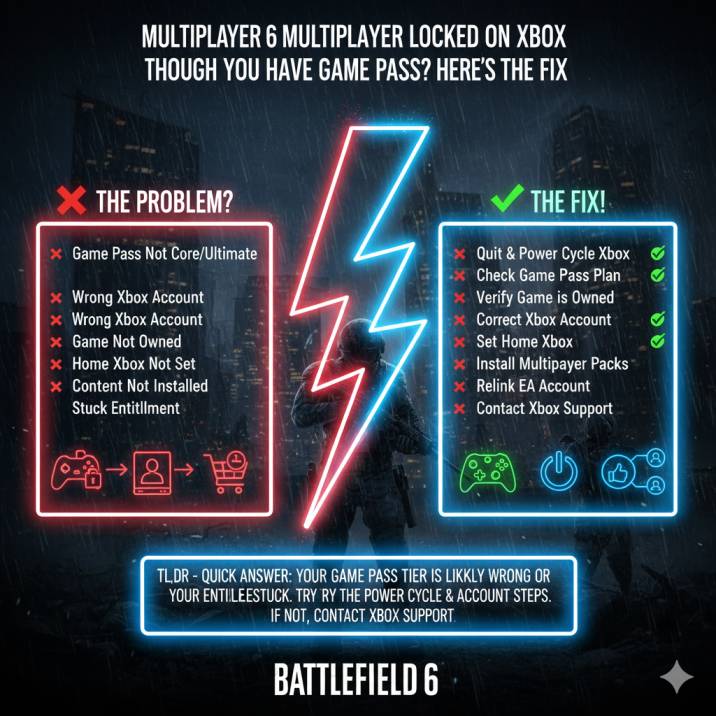
Why Battlefield 6 Multiplayer Is Locked (Even With Game Pass)
Battlefield 6 multiplayer only unlocks when all three of the following conditions are met at the same time. Miss even one, and the game will treat you like you don’t have access.
- You own Battlefield 6 (digitally or via the same account)
- You have Game Pass Core or Game Pass Ultimate, which includes console online multiplayer
- You’re signed into the exact Xbox account that owns both the game and the subscription
If any one of these doesn’t line up — wrong account, wrong Game Pass tier, or missing ownership — Battlefield 6 can’t verify your multiplayer entitlement. When that happens, it automatically locks all online modes and kicks you over to the Game Pass subscription screen, even if you’re already paying for it.
Read also:Battlefield 6 – DB-12 Unlock Progress Display Issue : Solved
Step-by-Step Fixes That Actually Work
1️⃣ Make Sure You Actually Own Battlefield 6
This one catches way more people than you’d expect, especially if you assumed Game Pass covered everything.
Battlefield 6 is not included with Xbox Game Pass. Game Pass only gives you access to online multiplayer, not ownership of the game itself. That means you still need to have purchased Battlefield 6 on your account.
Double-check this:
- Open the Xbox Store
- Search for Battlefield 6
- Look at the purchase status
It must clearly say Owned.
If it says Buy, Purchase, or shows a price, that’s exactly why multiplayer is locked — the game doesn’t detect a valid license, so it blocks online modes entirely.
2️⃣ Check Your Game Pass Plan (Very Important)
To play Battlefield 6 online on Xbox, you must have a Game Pass plan that includes console multiplayer. Not all plans do, and this is where a lot of players get tripped up.
You need one of the following:
✅ Game Pass Core
or
✅ Game Pass Ultimate
❌ PC Game Pass does NOT count for console multiplayer, even if your subscription is active.
To check your plan:
Settings → Account → Subscriptions
If your current plan doesn’t include console online play, Battlefield 6 will keep multiplayer locked and redirect you to the subscribe screen every time.
3️⃣ Make Sure You’re Using the Right Xbox Account
This is the classic mistake and one of the most common causes of this issue.
If:
- Game Pass is on Account A
- You’re launching Battlefield 6 on Account B
Multiplayer will stay locked, no matter what.
Sign out and launch the game using the same Xbox account that:
- owns Battlefield 6
- pays for Game Pass
It has to be the same account. No exceptions.
Read also: Battlefield 6 Red Bull Challenges Not Tracking Wins: Solved
4️⃣ Using Home Xbox Sharing? Double-Check It
If you’re sharing Game Pass with another account, this step is crucial. Home Xbox sharing doesn’t always sync properly, and when it breaks, multiplayer permissions are usually the first thing to disappear.
Do this on the account that owns Game Pass:
- Sign in to that account
- Go to Settings → General → Personalization → My Home Xbox
- Set this console as the Home Xbox
- Restart the console
Once that’s done, sign back into your main profile and launch Battlefield 6 again.
5️⃣ Check That Multiplayer Content Is Installed
Sometimes Battlefield 6 installs incorrectly and skips or corrupts the multiplayer component, which can cause all online modes to appear locked.
Here’s what to check:
- Go to My Games & Apps
- Highlight Battlefield 6
- Press the Menu button → Manage game and add-ons
- Install anything that’s missing or marked as not installed
- Restart the game
Once everything is installed properly, multiplayer should unlock if your entitlements are in order.
6️⃣ Remove and Re-Add Your Xbox Profile (Underrated Fix)
This one sounds a bit extreme, but it’s an underrated fix that refreshes broken or stuck entitlements tied to your Xbox account — and it works more often than you’d think.
Do this:
- Go to Settings → Account → Remove accounts
- Remove your Xbox profile from the console
- Restart the console
- Add the account back and sign in
- Launch Battlefield 6
Yes, it’s a little annoying, but for many players this step alone unlocks multiplayer instantly.
7️⃣ Check Your EA Account Link
Battlefield 6 also relies on a valid EA account connection, and if that link glitches out, multiplayer access can break even if everything else looks fine.
What to check:
- Go to your EA account settings
- Confirm your Xbox account is linked
- If it already looks correct, unlink it and relink it anyway
- Restart Battlefield 6
This forces the game to re-verify your EA and Xbox entitlements, which can clear the issue.
Read also: Engineer Specialist 3 Repairs Not Counting in Battlefield 6? Solved
8️⃣ Last Resort (But Very Effective): Xbox Support
If you’ve tried everything above and you’re 100% sure you own Battlefield 6 and have the correct Game Pass plan, it’s time to escalate it.
Contact Xbox Support and explain that Battlefield 6 multiplayer is locked even though you have an active Game Pass subscription. Specifically ask them to refresh or re-trigger your Game Pass multiplayer entitlement on their end.
This is a known backend issue, and when support refreshes the entitlement, multiplayer access usually unlocks almost instantly. It’s not something you can fix yourself, but once it’s done, the problem is typically gone for good.
Common Questions (Quick Answers)
“Why does Battlefield 6 keep asking me to subscribe?”
Because the game can’t properly verify your multiplayer entitlement. In most cases, this happens because you’re signed into the wrong Xbox account, using a Game Pass plan that doesn’t include console multiplayer, or the entitlement itself is stuck and needs refreshing.
“Do I need Game Pass Ultimate?”
No. You don’t specifically need Ultimate. Game Pass Core OR Game Pass Ultimate both include console online multiplayer and will work for Battlefield 6.
“Is Battlefield 6 included with Game Pass?”
No. Battlefield 6 is not included with Xbox Game Pass, so you must purchase the game separately to access multiplayer.
Bottom Line
If Battlefield 6 multiplayer is locked on Xbox even though you already have Game Pass, it almost always comes down to one of three things:
- You’re signed into the wrong Xbox account
- You’re on the wrong Game Pass plan (no console multiplayer)
- Your multiplayer entitlement is stuck and needs a refresh
Work through the steps above in order and don’t skip ahead. In most cases, one of these fixes will unlock multiplayer and get you back on the battlefield in no time.
Read more articles:
- Battlefield 6 Hit Registration Issues Explained: Is Crossplay the Problem?
- Battlefield 6 Stuck on End of Round Screen (EoR): Solved
- Battlefield 6 Network Jitter & Micro Stutter: Why It’s Happening (and How to Fix It)
- Battlefield 6 Battle Pass Bonus Path Stuck? Fixes
- Battlefield 6 Gyro Aiming Not Working on PS5? Fixed