
So… you load into a match, pick Recon, pull out your weapon—and suddenly your hands are gone.
No gloves. No arms.
Just floating guns with a few red highlights, like you’ve accidentally unlocked some kind of stealth superpower you definitely didn’t equip.
Relax—you didn’t break the game, your settings are fine, and your GPU isn’t about to explode.
You’ve just run into a known Battlefield 6 cosmetic bug that’s been catching a lot of players off guard.
It’s a strange one, especially the first time you see it, because everything else feels completely normal. Your weapons still work, your aim is fine, and movement isn’t affected at all—it just looks wrong. The issue is purely visual, tied to a specific cosmetic setup, and not something you caused by playing the game “wrong.”
Here’s what’s actually going on behind the scenes, why this bug happens, and—most importantly—what you can do right now to fix it and get back to playing without the floating-gun distraction.
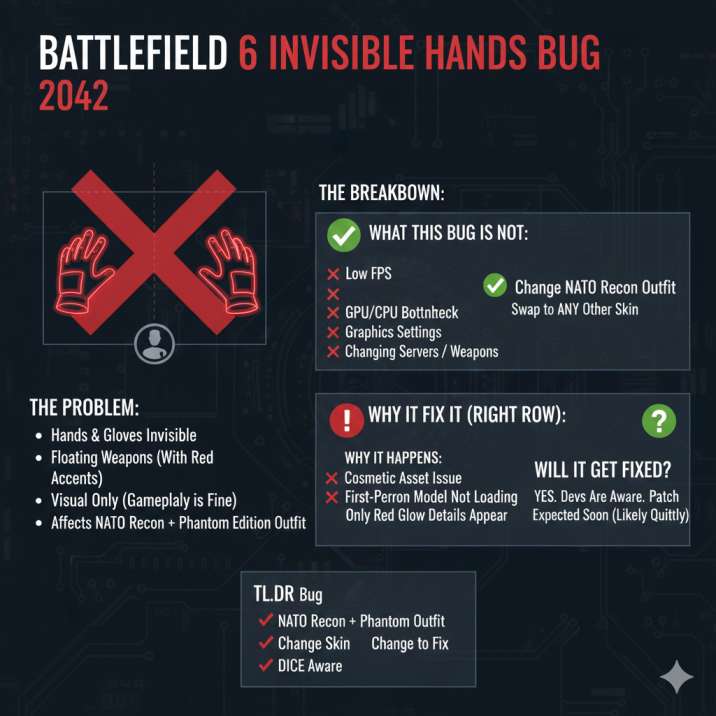
What’s the Invisible Hands Bug in Battlefield 6?
The Battlefield 6 invisible hands bug is a purely visual glitch where your character’s hands and gloves simply don’t show up in first-person view while you’re holding a weapon. Instead of seeing your arms like normal, you’re left staring at a floating gun, sometimes with only a few glowing red details where the gloves should be.
When this bug happens, you’ll usually notice a few consistent things:
- Your hands and gloves are completely invisible
- Your weapon model looks totally fine
- Small red highlights on the gloves may still appear
- Gameplay itself feels 100% normal
The important thing to know is that this bug does not affect combat at all. Your shooting, aiming, recoil control, and movement are unchanged. It’s distracting and looks broken, sure—but it won’t make you lose gunfights or mess with your performance. It’s one of those bugs that looks worse than it actually is.
Read also: Battlefield 6 Defib Pads Not Working : Solved
Who Does This Bug Affect?
This one isn’t random at all—it’s actually very specific, which is why some players never see it while others run into it immediately.
The invisible hands bug only shows up if you’re using:
- Battlefield 6
- The NATO Recon class
- The Phantom Edition outfit
- Any weapon, whether it’s a rifle or a pistol
- First-person view
You’ll notice it in both:
- The firing range
- Regular online multiplayer matches
The good news? It’s easy to confirm. Switch to a different Recon outfit and—boom—your hands instantly come back. No restart, no settings changes, no extra steps. That quick fix is also a big clue that this is a cosmetic issue, not a deeper gameplay or performance problem.
Why Are My Hands Invisible?
Short version:
It’s a cosmetic asset issue, not a performance, hardware, or graphics problem on your end.
Longer (but still simple) explanation:
In Battlefield 6, the game uses separate models for different viewpoints:
- One model for first-person arms
- A different model for the third-person character that other players see
In this case, the Phantom Edition first-person arm model for NATO Recon isn’t loading the way it should. The base glove mesh fails to appear in first-person view, while smaller visual elements—like the red glowing details—still load correctly.
That’s why it looks like your gloves are half-visible and half-missing. The game is essentially trying to render part of the cosmetic without the main model attached, resulting in the “floating weapon” effect. It looks broken, but underneath, everything is still working exactly as intended.
What This Bug Is Not
Before you start messing with settings or thinking about a reinstall, it’s worth knowing what won’t fix this issue—because a lot of players try these first and end up wasting time.
This bug is not caused by:
- Changing graphics settings
- Updating or rolling back GPU drivers
- Clearing the shader cache
- Switching weapons or loadouts
- Changing servers or regions
- Restarting the game
None of those will bring your hands back. The big giveaway is that changing outfits instantly fixes the problem. That tells us everything we need to know: this isn’t a performance issue, a hardware problem, or a network bug. It’s a pure cosmetic glitch, tied specifically to one outfit and one class, and nothing more.

How to Fix the Invisible Hands Bug (Right Now)
There’s only one real solution at the moment:
✅ Don’t use the Phantom Edition outfit on NATO Recon
That’s it.
- Swap to any other Recon outfit
- Hands and gloves will immediately appear again
- No gameplay downside, just cosmetic
There’s no hidden setting or workaround beyond this.
Read also: Community Revive Award – Battlefield 6 (Complete Unlock Guide)
Has DICE Acknowledged the Bug?
Yes.
Players have reported the issue, and the developers have confirmed it’s been passed to the game team. There’s no announced fix date yet, but this kind of bug is usually handled in a future update.
Since it’s visual-only, it’s likely not being hotfixed—but it should be patched eventually.
Will This Get Fixed?
Most likely, yes.
Based on how past Battlefield updates have handled similar issues, first-person cosmetic bugs usually do get fixed, even if they’re not treated as urgent problems. These kinds of glitches tend to be bundled into regular game updates rather than rushed out as hotfixes, especially since they don’t affect gameplay or balance.
When the fix does arrive, it may come in quietly. Don’t be surprised if it shows up in a patch without being clearly listed in the patch notes—or mentioned at all. That’s pretty common for smaller cosmetic fixes.
So while there’s no confirmed ETA right now, the odds are good this bug won’t stick around forever. Until then, swapping outfits is the easiest way to avoid it and keep playing without the distraction.
Wrapping Up
- Your hands aren’t actually missing—you’ve just hit a known bug in Battlefield 6
- It only affects NATO Recon using the Phantom Edition outfit
- It’s a first-person cosmetic issue, not a gameplay problem
- Shooting, aiming, and movement are completely fine
- Developers are aware of it
- Fix for now: switch to a different outfit
If you’re grinding Recon and don’t want the weird floating-gun look breaking immersion, just swap cosmetics and keep playing like normal. It’s annoying, but at least it’s easy to avoid until a proper fix rolls out.