
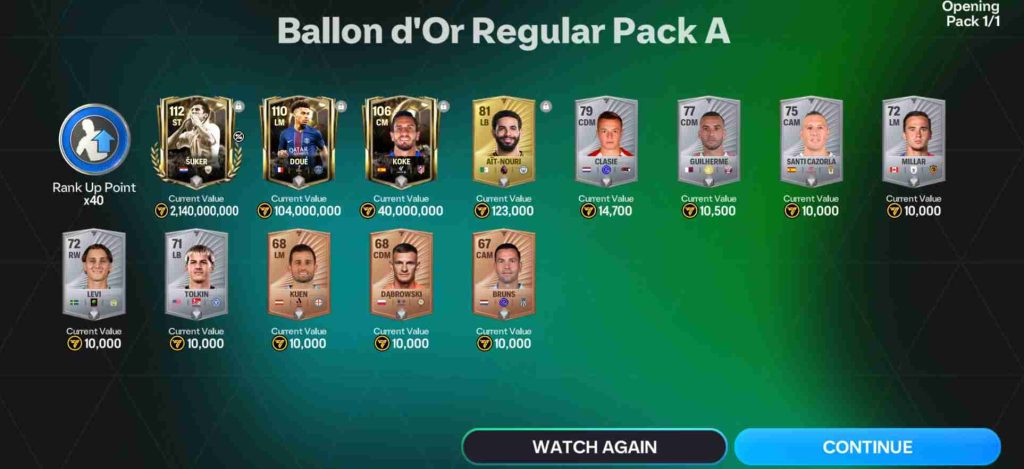
The 112 Ballon d’Or glitch is a recently reported bug in FC Mobile that has left many players frustrated. This glitch specifically affects the exchange and trading of the highly coveted 112-rated Ballon d’Or players, which are among the top-tier players in the game. Essentially, players who acquire these special cards may find that they cannot trade, exchange, or even use them in certain events, despite having unlocked or purchased them legitimately.
What is the 112 Ballon d’Or Glitch?
The glitch appears to be linked to the game’s server synchronization and mobile client updates. In many cases, players report that their Ballon d’Or players show the correct rating and stats in the club or collection screen but become untradable or disappear from the exchange menu when attempting a swap or trade.
This creates a major problem, especially for users who rely on these exchanges to build competitive squads for Squad Battles, H2H matches, or limited-time events.
From a technical standpoint, the glitch may stem from database errors or temporary mismatches between the server and player data. Since the 112 Ballon d’Or cards are limited and highly valuable, any disruption in their trading mechanism can cause significant gameplay and economic imbalance within the game.
Community forums and social media have been flooded with players sharing screenshots of the bug, showing empty exchange slots, or warning others about the instant disconnects that sometimes accompany attempts to trade these players.
In short, the 112 Ballon d’Or glitch is more than just a minor inconvenience—it directly affects player progression, in-game economy, and overall enjoyment of FC Mobile 2025.
Understanding this glitch is the first step toward finding reliable fixes or workarounds while waiting for official patches from the developers.
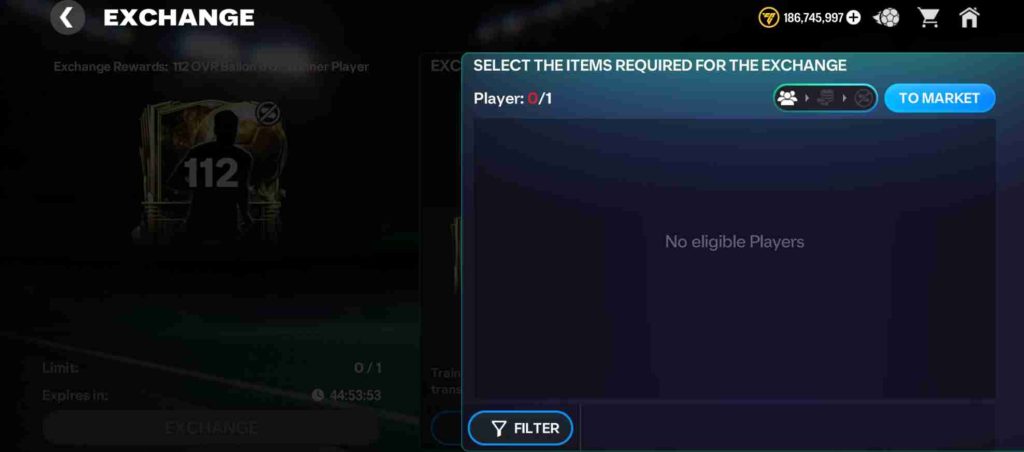
Symptoms of the Glitch
The 112 Ballon d’Or glitch in FC Mobile 2025 manifests in several clear and frustrating ways. The most common symptom is that players cannot exchange their 112-rated Ballon d’Or cards, even though the cards appear in their inventory. The exchange option often appears greyed out, preventing users from initiating trades or completing standard exchanges that are essential for building competitive squads.
In addition to the disabled exchange option, some players notice that their Ballon d’Or cards disappear from trade menus or show incorrect status when attempting to send or receive them. Others experience instant disconnects or server errors specifically when accessing the exchange screen, which interrupts gameplay and sometimes prevents progress in Squad Battles or special events.
Another subtle symptom is the inconsistency in inventory display. Cards may appear normally in the collection screen, showing the correct rating and stats, but the system does not recognize them as tradable items. This creates confusion, especially for players trying to complete limited-time events or exchange cards for high-value rewards.
Overall, these symptoms indicate that the glitch is not just a visual bug, but a functional error affecting the server-client interaction, trade validation, and overall gameplay experience in FC Mobile 2025.
How Frequently This Bug Happens
The 112 Ballon d’Or glitch in FC Mobile 2025 occurs with varying frequency, but reports indicate it is relatively common during high-traffic periods. Players frequently encounter the bug when trying to exchange or trade their 112-rated Ballon d’Or cards, with symptoms such as a greyed-out exchange option or items appearing in inventory but remaining untradable.
Community forums, Reddit threads, and social media posts show spikes in reports during peak gaming hours, particularly evenings and weekends, suggesting that server load plays a major role. The glitch also tends to appear after game updates or maintenance cycles, when server-client synchronization can temporarily fail.
While not every player experiences the issue, those affected often find it frustrating, as it disrupts squad building, events, and trading strategies. Awareness of these patterns can help players anticipate problems and avoid exchanges during high-risk times.
Common Causes of FC Mobile Exchange Bugs
FC Mobile 2025 has become one of the most engaging mobile football games, but players often encounter frustrating issues related to exchange bugs, particularly with high-value cards like the 112 Ballon d’Or players. Understanding the common causes of these bugs can help players anticipate problems and potentially avoid them while trading, exchanging, or participating in events.
1. Server Synchronization Issues
One of the most frequent causes of exchange bugs is server-client synchronization errors. FC Mobile relies on real-time communication between the game client on your device and EA’s servers. When this connection is disrupted—due to high traffic, server overload, or temporary downtime—the server may fail to register certain actions, such as exchanges or trades. As a result, cards may appear in your inventory but become untradable, or the exchange button may be greyed out.
2. Game Updates and Maintenance
Another common cause occurs after game updates or server maintenance. Developers regularly release updates to introduce new packs, events, and bug fixes. During these updates, the database may temporarily misalign, causing issues with previously tradable cards. Many players report that immediately after an update, their 112 Ballon d’Or cards or other rare players cannot be exchanged until the next patch or server synchronization.
3. Device-Specific Glitches
Sometimes, the bug is not entirely server-related but instead occurs on specific devices. Differences in Android and iOS operating systems, or even particular device models, can create compatibility issues. For instance, some Android users experience exchange problems more frequently, possibly due to how the game client interacts with server protocols. Device-specific bugs can also occur after app reinstallation or clearing cached data, temporarily affecting trading functionalities.
4. Network Instability
A weaker or unstable internet connection can trigger exchange errors, even if the rest of the game seems to function normally. Mobile players using Wi-Fi or mobile data during peak hours may face instant disconnects or timeouts when attempting to trade cards. While this is not strictly a bug, network instability often mimics server-side issues, making it hard for players to determine whether the problem is on their end or with the game servers.
5. Account or Inventory Errors
Exchange bugs can also stem from account-specific problems. Multiple accounts on the same device, corrupted save files, or incomplete transactions can cause the system to flag certain cards as untradable. In some cases, this happens when the game detects duplicate items or conflicts between different storage devices, temporarily restricting exchanges to prevent data loss.
6. Event and Pack Limitations
Finally, some exchange issues are linked to game mechanics rather than bugs. Limited-time events or pack releases sometimes impose temporary restrictions on trading high-rated players. While this is intentional, it can appear as a bug to players unaware of these rules.
In conclusion, FC Mobile exchange bugs often arise from a mix of server synchronization errors, post-update issues, device-specific glitches, network instability, and account conflicts. Understanding these causes helps players troubleshoot effectively and reduces frustration when high-value cards like the 112 Ballon d’Or players become temporarily untradable.
Step-by-Step Fixes for the 112 Ballon d’Or Exchange Glitch
The 112 Ballon d’Or glitch in FC Mobile 2025 has been a persistent problem for players trying to exchange these high-value cards. This glitch often renders cards untradable, greyed out in the exchange menu, or even causes instant disconnects, disrupting gameplay. Here’s a detailed, 20-point guide to fixing this glitch and regaining full functionality.
1. Check EA Server Status
Many exchange issues are server-side rather than client-side.
- Visit the official EA server status page or follow EA FC Mobile’s Twitter/Discord channels for announcements.
- If servers are under maintenance or overloaded, exchanges may fail, regardless of your device setup.
- Waiting for the servers to stabilize is sometimes the quickest solution.
2. Restart the Game
Simple restarts can resolve temporary synchronization issues.
- Close FC Mobile completely and remove it from recent apps.
- Relaunch the game and check the exchange menu.
- This step clears temporary memory glitches that may prevent card trades.
3. Restart Your Device
A fresh device restart helps clear cached network sessions.
- Turn off your phone for 1–2 minutes and power it back on.
- Restarting ensures smoother communication between the game client and servers.
4. Verify Your Internet Connection
Unstable networks are a major cause of the glitch.
- Switch between Wi-Fi and mobile data to see if one is more stable.
- Avoid exchanges during peak hours with high server load.
- Use a speed test app to confirm ping is low (<100ms) for smooth server interaction.
5. Update FC Mobile
Outdated game versions can trigger card exchange issues.
- Visit your App Store or Play Store and ensure the game is fully updated.
- Patches often address server-client compatibility and card-specific bugs.
6. Clear Cache on Android Devices
Android users can clear cached data to resolve exchange errors.
- Navigate to Settings → Apps → FC Mobile → Storage → Clear Cache.
- Avoid clearing data unless necessary, as it may log you out.
- Clearing cache can fix visual glitches and unresponsiveness in the exchange menu.
7. Log Out and Log Back In
Re-login forces the client to resync with servers.
- Go to Settings → Account → Log Out, then log back in.
- Check if previously untradable cards become exchangeable.
8. Reinstall the Game
A clean reinstall can resolve corrupted files or client-side bugs.
- Backup your account using EA login or linked social account.
- Uninstall the game, restart your device, and reinstall the latest version.
- Log in and test the exchange menu.
9. Switch Devices
Sometimes the bug is device-specific.
- Try logging into FC Mobile on another phone or tablet.
- If the cards are tradable on another device, the problem is likely your original device’s configuration.
10. Avoid High-Traffic Hours
Server overload often causes exchange failures.
- Peak hours like evenings and weekends see more players online.
- Schedule exchanges during off-peak hours to reduce chances of disconnects or greyed-out options.
11. Check Account Conflicts
Multiple accounts on the same device can trigger untradable cards.
- Ensure you are logged into the correct EA account.
- Conflicts may arise if multiple storage devices or cloud saves are linked.
12. Verify Inventory Status
Sometimes cards appear in your collection but are flagged incorrectly.
- Check the card’s status in both club inventory and exchange menu.
- Cards marked as “event-locked” or “untradable” cannot be exchanged until restrictions are lifted.
13. Complete Pending Transactions
Incomplete trades or pack openings may prevent new exchanges.
- Finish all ongoing exchanges or pack unboxings.
- Pending actions can lock the system, making some cards untradable.
14. Avoid Using Third-Party Tools
External apps or mods may cause account conflicts.
- Only use official EA FC Mobile client.
- Third-party tools may corrupt inventory data and trigger the glitch.
15. Monitor Community Forums
Players often discover temporary workarounds.
- Check Reddit, Discord, and EA forums for recent solutions.
- Community-tested methods can provide immediate fixes before official patches.
16. Contact EA Support
If all else fails, contact official support.
- Provide screenshots of the greyed-out exchange menu and card inventory.
- Include device type, OS version, and time of occurrence.
- EA support can manually reset card status or escalate the issue.
17. Use a Different Network
Network restrictions may block certain game actions.
- Switch to another Wi-Fi network or mobile data provider.
- Sometimes ISP or router settings interfere with server communication.
18. Check for Regional Restrictions
Some exchanges or events may be region-locked.
- Verify that your region allows trading of high-value cards.
- Region-specific restrictions can cause confusion, appearing as a bug.
19. Be Patient After Updates
After a patch, servers may need time to resynchronize all player data.
- Give it a few hours before retrying exchanges.
- Attempting immediately may trigger temporary glitches.
20. Prevent Future Glitches
Follow these preventive steps:
- Always update the game promptly.
- Avoid trading during peak hours or immediately after updates.
- Regularly clear cache and restart the device to maintain smooth server communication.
- Link your account to EA servers for secure data backup.
The 112 Ballon d’Or exchange glitch can be frustrating, but following these 20 detailed steps addresses the majority of causes, from server-side issues to device-specific errors. By combining preventive measures with practical fixes—like restarting, updating, and verifying accounts—players can restore tradable functionality and enjoy uninterrupted gameplay.
Tips to Prevent FC Mobile Bugs in the Future
FC Mobile 2025 is one of the most dynamic mobile football games available, but like any online multiplayer game, it occasionally experiences bugs—especially related to card exchanges, server connectivity, and gameplay glitches. While developers frequently release patches and updates, players can take proactive steps to minimize bugs and maintain a smooth gaming experience. Here are actionable tips to prevent FC Mobile bugs in the future.
1. Keep Your Game Updated
Always ensure you are using the latest version of FC Mobile. Developers release updates to fix known bugs, improve server stability, and add new content. Ignoring updates can result in:
- Exchange glitches
- Card inventory issues
- Event-related errors
Regularly check the Google Play Store or Apple App Store for updates and install them immediately to stay ahead of bugs.
2. Maintain a Stable Internet Connection
Many bugs, especially in card exchanges or Squad Battles, are caused by unstable or slow internet connections. To prevent this:
- Use a reliable Wi-Fi network or a mobile network with strong signal strength.
- Avoid performing high-risk actions (like exchanging high-rated players) during peak internet congestion.
- Run a speed test to ensure your latency is low, ideally under 100ms, which improves server communication.
3. Restart Your Device Regularly
Regularly restarting your phone or tablet helps clear temporary cache, memory leaks, and background app conflicts. This simple step reduces the likelihood of:
- Game crashes
- Frozen menus
- Exchange glitches
Restarting at least once a day during extended gaming sessions keeps your device running smoothly.
4. Clear Cache Without Deleting Data
Over time, cached files can become corrupted, affecting how FC Mobile interacts with servers. On Android devices, go to Settings → Apps → FC Mobile → Storage → Clear Cache. iOS users can achieve similar results by reinstalling the app periodically. Clearing cache helps:
- Fix display and menu glitches
- Reduce lag in high-traffic events
- Prevent untradable card issues
5. Link Your Account to EA Servers
Always ensure your game account is linked to your EA account, Google, or Apple ID. This prevents data loss if:
- Your device fails
- The app is uninstalled
- You encounter server-related glitches
Account linking also allows for faster recovery and troubleshooting when bugs occur.
6. Avoid Third-Party Apps or Modifications
Using unofficial apps, mods, or cheats can corrupt game files or trigger server-side conflicts. Stick to the official FC Mobile client to prevent:
- Card trading issues
- Account restrictions
- Potential permanent bans
Playing on the official app ensures compatibility with all game updates.
7. Check Server Status Before Major Actions
Many exchange bugs occur when servers are overloaded. Before opening high-value packs, exchanging players, or participating in events:
- Check the official EA server status page
- Follow FC Mobile’s social media announcements
- Avoid trading during peak hours or immediately after an update
This prevents glitches caused by server-side delays or sync errors.
8. Complete Pending Actions Before Starting New Ones
Leaving incomplete exchanges, pack openings, or event tasks can block new actions. Always finish ongoing processes before:
- Attempting to exchange high-rated cards
- Joining Squad Battles
- Entering limited-time events
This ensures your account data is properly synced with the server.
9. Use a Device with Sufficient Storage and Performance
Low storage or underpowered devices can lead to game crashes and glitches. Maintain:
- At least 2–3 GB free storage for cache and updates
- Minimal background apps during gameplay
- A stable operating system version compatible with the game
A capable device reduces crashes and inventory-related bugs.
10. Regularly Backup Your Account
Even with preventive measures, some glitches are unavoidable. Regularly backing up your account ensures you can restore progress quickly. Backup options include:
- EA account linking
- Google Play or Apple Game Center integration
- Cloud saves for device transitions
Backups also reduce frustration in the event of exchange glitches or accidental card loss.
11. Avoid Exchanging Cards During High-Traffic Events
Peak times, such as weekend events or new pack releases, often lead to server congestion. Avoid exchanging high-value cards during these periods to minimize the risk of:
- Greyed-out exchange menus
- Cards becoming temporarily untradable
- Instant disconnects
Schedule exchanges during off-peak hours for a smoother experience.
12. Monitor Community Feedback and Forums
Stay active in Reddit, Discord, and EA forums to learn about temporary workarounds for new glitches. Community feedback often identifies issues before official patches are released, allowing players to avoid:
- Problematic actions
- Risky trades
- Confusing event errors
13. Reinstall the Game Periodically
A fresh installation can prevent many glitches by removing corrupted client files. Before reinstalling:
- Backup your account
- Remove the app and restart your device
- Reinstall the latest version from the official store
This ensures your client runs smoothly and reduces crashes or trading errors.
14. Avoid Multiple Accounts on the Same Device
Using multiple accounts on a single device can create conflicts, especially in storage or trading. Stick to one account per device to prevent glitches related to:
- Inventory mismanagement
- Exchange errors
- Account authentication issues
15. Perform Regular Device Maintenance
Keep your device updated, remove unnecessary apps, and check for malware. A well-maintained device reduces:
- Network issues
- Game lag
- Unexpected crashes that trigger bugs
16. Stay Updated on Patch Notes
Reading FC Mobile patch notes informs you about:
- New features
- Fixed bugs
- Known issues
Being aware allows you to avoid actions that could trigger glitches while waiting for the next update.
17. Avoid Excessive Multitasking
Running many apps in the background may interfere with game performance. Close unnecessary apps to prevent:
- Frame drops
- Menu freezes
- Exchange glitches
18. Report Bugs Promptly
If you encounter a bug, report it immediately to EA Support. Early reports help developers:
- Identify recurring glitches
- Release faster fixes
- Provide temporary workarounds
19. Use Stable Regional Servers
If your region frequently experiences server overload, consider connecting through regions with stable connectivity, if allowed. A stable server reduces:
- Disconnects
- Trading errors
- Inventory sync issues
20. Practice Patience After Updates
Immediately after updates, some glitches are unavoidable. Wait a few hours for server data to synchronize before performing critical actions like exchanging 112 Ballon d’Or cards.
Community Reports & Player Experiences
The 112 Ballon d’Or glitch in FC Mobile 2025 has generated significant discussion across forums, Reddit threads, and social media groups. Many players report that their high-rated cards become untradable, with the exchange option greyed out despite appearing normally in their inventory. These firsthand accounts highlight that the glitch is widespread and not limited to a specific device or region.
Players often share screenshots showing cards locked in the exchange menu, along with timestamps correlating the issue with server maintenance, game updates, or peak traffic hours. Some users report that attempting to trade during these times leads to instant disconnects, further disrupting gameplay. Community discussions also reveal that Android users experience the glitch slightly more often than iOS players, suggesting device-specific variations.
Beyond forums, social media platforms like Twitter and Discord have become hubs for temporary fixes and workarounds. Players advise others to restart the game, switch networks, or delay trades until off-peak hours. Many emphasize patience, noting that the glitch often resolves after a few hours or an official patch.
Overall, community reports provide valuable insights into the glitch’s patterns, triggers, and practical solutions, helping other players navigate the issue while waiting for permanent fixes from EA.
Other Common FC Mobile Bugs & Glitches
While the 112 Ballon d’Or exchange glitch is one of the most prominent issues in FC Mobile 2025, players frequently encounter other bugs and glitches that affect gameplay. One common problem is the instant disconnect bug, which can occur during Squad Battles, H2H matches, or live events, often causing players to lose progress or points despite a stable internet connection.
Another widespread issue involves unresponsive packs or untradable players. Sometimes cards appear in inventory but cannot be used in events, exchanged, or upgraded, similar to the Ballon d’Or glitch but affecting a broader range of items. Players also report login issues, particularly on devices with multiple saved accounts or conflicting storage options, where the game may fail to load profiles correctly.
Gameplay-related bugs include slow animations, freezes, or crashes during high-intensity matches, often caused by device performance or temporary server overloads. Minor visual glitches, such as incorrect card ratings or stats not updating properly, are also common but usually less disruptive.
These recurring bugs highlight the importance of keeping the game updated, maintaining stable network connections, and following preventive practices. Awareness of these issues allows players to anticipate problems, apply workarounds, and reduce frustration while enjoying FC Mobile 2025.
FAQ About FC Mobile Glitches
1. What is the 112 Ballon d’Or glitch?
The 112 Ballon d’Or glitch occurs when high-rated cards become untradable or greyed out in the exchange menu. Players may still see the cards in their inventory, but they cannot trade, upgrade, or use them in certain events.
2. Why can’t I exchange my 112 Ballon d’Or cards?
This is usually caused by server synchronization issues, post-update bugs, device-specific glitches, or temporary network instability. Sometimes pending actions or account conflicts can also prevent exchanges.
3. How do I fix instant disconnects during matches?
Check your internet connection, switch networks if needed, and avoid peak traffic hours. Restarting the game or device, updating to the latest version, and ensuring servers are operational also helps.
4. Are these glitches common on all devices?
Most bugs affect both Android and iOS, but some, like certain exchange errors, may be slightly more common on Android due to device-client interactions.
5. Can reinstalling the game fix the bugs?
Yes, a clean reinstall often resolves client-side glitches, corrupted files, and cache-related issues. Always backup your account before reinstalling.
6. Does EA provide official fixes?
EA regularly releases patches and updates. You can also contact EA Support with screenshots and device details for assistance.
7. How can I prevent future glitches?
Keep the game updated, maintain a stable internet connection, clear cache periodically, avoid third-party apps, and follow preventive practices like off-peak trading and device maintenance.
Conclusion
FC Mobile 2025 offers an immersive and competitive football experience, but like any online game, it occasionally faces bugs and glitches, ranging from the notorious 112 Ballon d’Or exchange issue to instant disconnects, untradable players, and login errors. Understanding these problems, their causes, and practical fixes empowers players to maintain smooth gameplay, protect high-value cards, and reduce frustration.
By following step-by-step solutions—such as checking server status, restarting the game and device, clearing cache, updating the app, and contacting EA support—players can resolve most glitches efficiently. Preventive measures like keeping the game updated, maintaining a stable network, completing pending actions, and linking accounts to EA servers further minimize the risk of future issues.
Community insights, forums, and player-reported experiences also serve as valuable resources, offering temporary workarounds and early alerts about new bugs. Combining these strategies ensures that your FC Mobile experience remains enjoyable, uninterrupted, and competitive, allowing you to focus on building your dream squad and excelling in events.
In short, being proactive, informed, and patient is key to navigating FC Mobile’s occasional glitches, ensuring your gameplay is as smooth and rewarding as possible.